

Check out our latest golf collection!
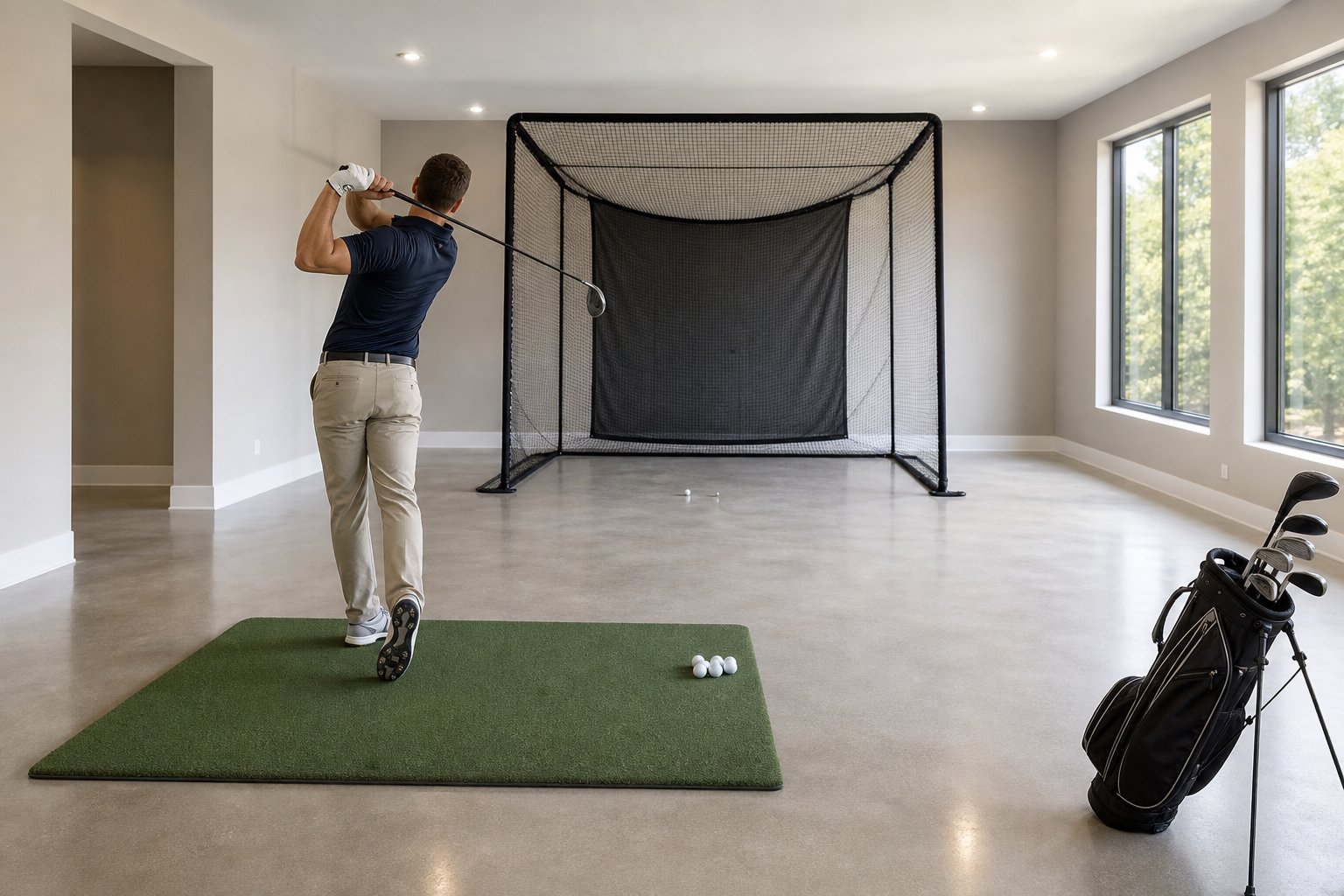
An indoor golf practice net can keep your swing sharp all year, but the setup must provide enough room to practise safely and comfortably. The net may fit in a compact area, yet you also need clearance for your stance, backswing, follow-through, ball flight, and net movement.
For most full-swing practice setups, aim for about 9 to 10 feet of ceiling height, 12 feet or more of width, and approximately 15 feet of total depth. Taller golfers, wider swings, tracking equipment, and future simulator upgrades may require additional space.
Before buying a net, measure from the hitting mat to the lowest overhead obstruction and test your longest club in the planned hitting position. This guide explains how to measure your room, choose the right net, protect nearby surfaces, and create an indoor golf practice area that suits your space and goals.
Key Takeaways
- A practical full-swing setup needs about 9 to 10 feet of ceiling height, at least 12 feet of width, and approximately 15 feet of total depth.
- Taller golfers and players adding simulator equipment may need more ceiling clearance and room depth.
- Careful planning provides enough space for your backswing, follow-through, net flex, and occasional off-centre shots.
Core Space Requirements for Hitting Nets
A golf net setup depends on three main measurements: ceiling height, width, and depth. Get these wrong and you will either limit your practice or risk damaging your belongings or walls.
Ceiling Height Essentials
You will want a clear 10 feet of ceiling height for most golfers swinging a driver. Nine feet may be enough for some players, but it leaves less room for tall golfers, upright swings, lights, ductwork, or beams.
What really matters is the space from your hitting mat to the lowest object in your swing path. Basements often have HVAC runs or beams that reduce usable clearance by 6 to 18 inches compared with the listed ceiling height.
Stand where you plan to hit, grab your driver, and take a slow practice swing. If your club head gets within 6 inches of anything solid, the space may not be safe for driver practice. With 8 to 8.5 feet of clearance, many golfers will need to stick to irons, wedges, or partial swings. Anything below 8 feet is generally unsuitable for full swings.
Wedge shots also require attention because their steep launch angle may send the ball towards the ceiling even when your driver clears it.
Recommended Width for Safe Swings
Width separates a comfortable practice space from one where you feel restricted. Twelve feet is a practical minimum for many golfers hitting from near the centre, but it can still feel tight. Fourteen to 15 feet provides more comfortable clearance.
If you only have 12 feet, you may notice the walls during each swing. This can cause you to alter your natural movement and develop habits that affect your performance on the course. If you are working with less than 12 feet, you may need to hit off-centre.
Aim for 14 feet if possible. This gives you room for your follow-through and a buffer for off-centre shots. If the area must accommodate both right-handed and left-handed golfers, plan for at least 14 to 15 feet of width.
Optimal Room Depth and Ball Flight
Depth determines how far the ball travels before reaching the net and how much space you have behind your stance. Eight to 10 feet from the ball to the net works for many basic setups, although you should always follow the net manufacturer’s instructions.
Enough distance allows the ball to travel naturally while keeping the net close enough to capture shots safely. A poorly secured net or one placed too close to a wall may wear quickly or create excessive bounce-back.
Behind your hitting position, leave approximately 4 feet for your stance and swing. Add another 12 to 18 inches behind the net so it can flex. This brings the total room depth to approximately 15 feet for many basic setups.
Camera-based tracking equipment may work within this footprint, while radar-based systems often need additional room behind the ball and a longer ball-to-net distance. Always check the placement instructions for your specific device.
A complete simulator with a projector and enclosure may require more depth. For a basic net and mat, approximately 15 feet provides a practical starting point.
Planning Your Golf Practice Setup
Before you buy anything, determine how much usable space you have. Many golfers order a net and then discover that the ceiling is too low or the garage layout does not support a comfortable swing. Careful measurements can save time and money.
Measuring Your Available Space
Focus on usable width, total depth, and ceiling height. For full swings, many golfers should plan for at least 12 feet of width, approximately 15 feet of depth, and 9 to 10 feet of overhead clearance.
Width is about swinging freely. Measure from where you will stand, not just from wall to wall. Right-handed and left-handed golfers need clearance on opposite sides, so test the area using your natural stance and swing.
Depth depends on where you place any tracking equipment and how far the net sits from the hitting position. Many basic setups place the net 8 to 10 feet from the ball, but the correct distance depends on the net and equipment.
Ceiling height is often the biggest challenge. Stand on the hitting mat with your driver and take several slow practice swings. If the club gets within 6 inches of the ceiling or another obstruction, consider another location or limit the setup to shorter clubs. Remember that the hitting mat adds some height.
Addressing Tight or Odd-Shaped Rooms
Not every space is a perfect box. Golf nets can still work in rooms with beams, sloped ceilings, support posts, and unusual corners.
If your ceiling is low, use shorter clubs or set up beneath the highest section. Some golfers use lower-ceiling rooms for irons, wedges, and partial-swing drills instead of full driver swings.
L-shaped rooms can work well. Place the hitting area in the longer section and use the shorter section for storage or access. Support posts should remain outside the swing path and away from possible ball strikes.
If width is limited, position the hitting mat off-centre. A right-handed golfer may be able to move closer to the right wall to create more room on the swing side. This arrangement may not work equally well for both right-handed and left-handed players.
DIY Options for Small Spaces
Not everyone needs a complete garage simulator to improve. A simple setup can still support useful practice without taking over the entire room.
Ideas for Saving Space:
- Corner Setup: Position the net diagonally in a corner when its design allows it. Add side protection to catch off-centre shots.
- Retractable Nets: Mount a suitable net on a ceiling or wall track so it can be stored when the room is used for another purpose.
- Folding Nets: Portable nets that fold flat are easy to store and can be set up in a garage, driveway, or spare room.
If your space is tight, focus on partial swings, contact drills, and alignment work instead of full shots. A secure net, alignment sticks, and a stable mat can help you improve swing path and ball striking without a complete simulator.
Choosing the Right Practice Net and Enclosure
A suitable golf net protects your space and allows you to swing with confidence. Net size, safety features, materials, and installation all affect how well the practice area performs over time.
Selecting Net Size and Materials
A 10 by 10-foot hitting net covers a useful target area for many golfers, but a 12 by 12-foot net provides additional protection when space allows. Tall golfers and players with wide swings may benefit from the extra coverage. An 8 by 8-foot net may work for controlled iron shots or partial swings in a smaller area.
Net material is more important than many people realize. Heavy-duty nylon or polyester netting designed for golf balls will generally last longer than thin, general-purpose mesh. Look for reinforced edges and secure attachment points. The mesh should stop golf balls while limiting bounce-back.
If you plan to add a simulator later, an impact screen may be a useful upgrade. Impact screens support projected visuals and are commonly available in white or light grey.
Side Barriers and Foam Padding for Safety
Side barriers turn a basic net into a more complete enclosure that catches off-centre shots. Even experienced golfers miss occasionally, and side netting helps stop balls from reaching walls, windows, or nearby equipment. Side barriers should extend several feet towards the hitting area.
Protective padding around frames, poles, and nearby hard surfaces can reduce rebound and prevent damage. Use padding designed to absorb impacts rather than thin decorative foam.
Do not forget the floor. Rubber flooring, turf, or impact-rated panels behind the net can protect against balls that roll underneath, pass through an opening, or bounce back.
Permanent vs Portable Net Setups
Permanent enclosures attach to suitable wall or ceiling structures and create a dedicated space that is always ready. Basements and garages can work well if you can commit the area and install the system safely.
Portable nets fold for storage and can usually be set up quickly. They are useful in shared spaces, rented homes, or rooms that serve multiple purposes.
Permanent setups are generally sturdier and may support larger screens and side barriers. Portable nets provide flexibility but must still be secured and positioned according to their instructions.
Equipment Essentials for Indoor Practice
The right equipment turns a basic net into a useful practice station. Your hitting mat affects comfort and feedback, while tracking technology can provide data about your shots.
Hitting Mats and Surfaces
A good mat protects your floor and joints. Choose a surface with enough cushioning to absorb repeated impact without causing unnecessary strain on your wrists or elbows.
Thin mats may provide limited feedback and make poor contact feel better than it was. Quality mats use durable turf fibres and cushioning that allow the club to interact more naturally with the surface.
Look for mats between 4 by 5 feet and 5 by 5 feet to provide enough stance room. Smaller mats may force you to reposition frequently. Replaceable hitting strips can extend the mat’s useful life.
Consider what is beneath the mat. Concrete usually requires more cushioning than carpet or rubber flooring. A non-slip backing can help prevent the mat from moving during the swing.
Launch Monitors and Supporting Tech
Launch monitors can track measurements such as ball speed, launch angle, spin, and carry distance. The available data and required room dimensions vary by device.
Radar-based systems usually need space behind the golfer and enough ball flight before the net. Camera-based units may work in shorter rooms but can require controlled lighting and precise placement.
Portable systems can be moved between indoor and outdoor spaces, while overhead units save floor space and provide a fixed tracking position. More advanced systems may also measure club path, face angle, dynamic loft, and impact location.
Before purchasing any tracking system, confirm its minimum room dimensions, lighting requirements, software compatibility, and placement instructions.
Net Placement and Ball-to-Screen Distance
Many basic setups place the net approximately 8 to 10 feet from the hitting position. The correct distance depends on the net’s construction, size, anchoring method, and manufacturer instructions.
If you are using tracking equipment, follow its required distances between the device, ball, and net. Do not increase the ball-to-net distance unless the net still provides enough coverage for off-centre shots.
Impact screens and projectors have separate placement requirements. If you may upgrade to a complete simulator later, plan enough space for the screen, enclosure, projector, tracking system, and safe access around the hitting area.
Anchor or support the net so it cannot tip, slide, or collapse during use. Side netting provides additional protection against pulled, pushed, or shanked shots.
Optimizing Your Simulator Room for Comfort and Safety
A good golf simulator room needs more than suitable measurements. Lighting, ventilation, flooring, sound control, and wall protection all affect comfort and safety.
Lighting and Ventilation
Use even, adjustable lighting that keeps the hitting area visible without washing out the projected image. Avoid strong spotlights that create glare, deep shadows, or interference with camera-based tracking systems.
Do not position low lights directly above the hitting area. Mount fixtures outside the swing path and place them where your body and club will not create disruptive shadows.
Ventilation is important because electronics and physical activity can warm a small room quickly. A quiet floor fan, suitable air vent, or climate-control system can help maintain a comfortable temperature.
Position fans so they do not move loose netting or interfere with lightweight equipment.
Addressing Sound, Flooring, and Wall Protection
Golf ball impact can transmit noise through walls, ceilings, and floors. Acoustic panels, impact-rated padding, and properly tensioned netting can help reduce noise and protect surrounding surfaces.
Commercial-grade hitting mats with rubber backing generally reduce vibration better than thin turf placed directly on concrete. Make sure the mat provides enough room for your full stance and remains stable throughout the swing.
Protect exposed walls and hard surfaces within the possible ball path. Padding should cover areas likely to receive direct or deflected shots and should reduce rebound.
Safe Practice Routines and Safety Features
Check the net, side barriers, frame, anchors, and attachment points before every session. Replace damaged netting, worn ties, loose fasteners, or stretched supports before continuing to practise.
Begin with controlled swings and increase speed gradually. Avoid making a sudden increase in practice volume if you are not accustomed to repeated indoor hitting.
Keep clubs, bags, furniture, and other objects outside the swing path and away from the space behind the net or screen.
Inspect permanent enclosure hardware regularly. Repeated impacts can loosen fasteners and wear out ties, cords, and bungees over time.
Upgrading to a Full Golf Simulator Experience
Upgrading from a basic net to a complete indoor golf simulator adds performance data, visuals, and interactive practice options. You will need to plan for projector placement, software, tracking equipment, and sufficient room dimensions.
Projector Placement and Throw Distance
Projector throw distance determines how far the projector must sit from the impact screen to create the desired image size. Short-throw projectors may fill a standard screen from approximately 6 to 8 feet away, while standard models often need more distance. Confirm the exact throw ratio for your chosen projector and screen.
A ceiling-mounted projector keeps the floor clear and can help reduce shadows. It must be positioned outside the swing path and attached to a suitable structural surface. Side or floor mounting may also work, but image alignment and equipment protection require careful planning.
Brightness should match the screen size and ambient lighting. Compare projector brightness using recognized ANSI lumen specifications when possible.
Golf Simulator Software and Virtual Golf
Simulator software converts launch monitor data into visual ball flight, club statistics, practice modes, and virtual courses. Available options differ in graphics, physics, course selection, training tools, subscriptions, and equipment compatibility.
Choose software that supports your tracking system and provides the information most useful for your goals. Accurate shot feedback is usually more important for practice than highly detailed graphics alone.
Before purchasing software, confirm the system requirements, computer compatibility, internet needs, recurring fees, and supported practice or multiplayer modes.
Premium Features for Game Improvement
Premium simulator systems may track club path, face angle, swing plane, dynamic loft, and impact location. These features can be useful for experienced golfers working on specific swing changes.
Putting simulation may require additional cameras, optical tracking, or specialized surfaces. This equipment must be calibrated carefully to provide useful ball-roll feedback.
Multiplayer modes, tournaments, and virtual leaderboards can turn a simulator into a shared entertainment area. Allow additional room for seating and safe movement if several people will use the space.
Frequently Asked Questions
What ceiling height do most golfers need to swing a driver comfortably indoors?
Most golfers should aim for 10 feet of clear ceiling height. Nine feet may work for some players, but taller golfers and upright swings often require more room.
How much clearance should you leave behind the net to protect the wall and reduce bounce-back?
Leave approximately 12 to 18 inches behind the net, or follow the manufacturer’s instructions. The net needs enough room to flex without touching the wall.
What room width is practical for a full swing without feeling cramped or risking damage?
A width of 12 feet is a practical minimum for many golfers. Fourteen to 15 feet provides more comfortable clearance and better protection against off-centre shots.
How far should you stand from the net for realistic ball flight and safe capture?
Many basic setups place the ball 8 to 10 feet from the net. Follow the distance recommended for your net and any tracking equipment.
Can a practice net fit in a garage or basement, and what should you measure first?
Yes. Measure the lowest ceiling point first, followed by usable width, total depth, and any obstacles within the swing or ball path.
How much extra space do you need if you add a hitting mat, launch monitor, or impact screen later on?
Plan for a mat that is approximately 4 to 5 feet deep, plus the placement requirements of your tracking equipment. A complete simulator may need 15 to 20 feet of total depth and 12 to 15 feet of width.
Partager:
What Foods Should You Avoid Packing in a Compartment Snack Box for Upright Travel?
How to Practice Putting Start Line and Pace Control With a Home Putting Mat